If your Talk ‘N Text (TNT) SIM suddenly stops working, incomplete SIM Registration is often the reason. Many users in the Philippines attempt Online SIM Registration for their TNT SIM or SIM Card, but get blocked by unclear steps, unreliable links, or failed verification with no explanation. This page answers the exact questions users have about TNT SIM registration really be done online, which process is official, what you need to prepare, and how to complete registration properly so your SIM remains active and secure.
Can TNT SIM Be Registered Online in the Philippines?
Yes, Online SIM Registration is available for TNT SIM users in the Philippines but only through official channels. TNT operates under Smart Communications, a licensed Mobile Network Operator, which provides the approved online process. Registration must be completed on platforms managed by the telecom provider to ensure accuracy, security, and acceptance. Any site outside these official systems risks delays or rejection and may compromise your data.

Smart Communications as the Authorized Telecom Provider?
Smart Communications is the authorized Telecom Provider responsible for TNT services and registration. As part of the PLDT Group, Smart manages SIM Ownership records and enforces registration standards across its network. Because Smart is the official Mobile Network Operator, only Smart-managed platforms are valid for TNT registration. This ensures your SIM is properly linked to your identity and remains compliant with national requirements.
Government Oversight Under the SIM Registration Act (Republic Act No. 11934)
SIM registration is mandated by law under the SIM Registration Act, formally Republic Act No. 11934. Oversight is provided by the National Telecommunications Commission (NTC) to enforce Telecom Regulation and Government Compliance. The law requires all subscribers to register their SIMs through authorized providers, ensuring Telecom Compliance and reducing misuse. Failure to register through official channels can lead to service restrictions under the Act.
Bottom line: Register your TNT SIM online only via Smart Communications’ official platforms to meet Republic Act No. 11934 requirements and keep your service active and compliant.
Official Online Registration Portal for TNT SIM
The Online Registration Portal for TNT SIM is provided through the Official Website operated by Smart. This Smart SIM Registration Portal supports Web-Based Registration and is the only place where TNT users should complete registration. Using the official portal ensures your details are processed correctly and securely, avoiding delays or rejection that can happen on unofficial sites.
What to know before you proceed:
Step-by-Step Process to Register a TNT SIM Card Online
Follow these steps on the official portal to complete registration smoothly:
- Register your TNT number on the portal.
- Submit your personal details accurately.
- Upload clear images of your ID for verification.
- Confirm your submission and wait for review.
- Receive approval and Activate your SIM ,SIM Activation completes once verification is successful.
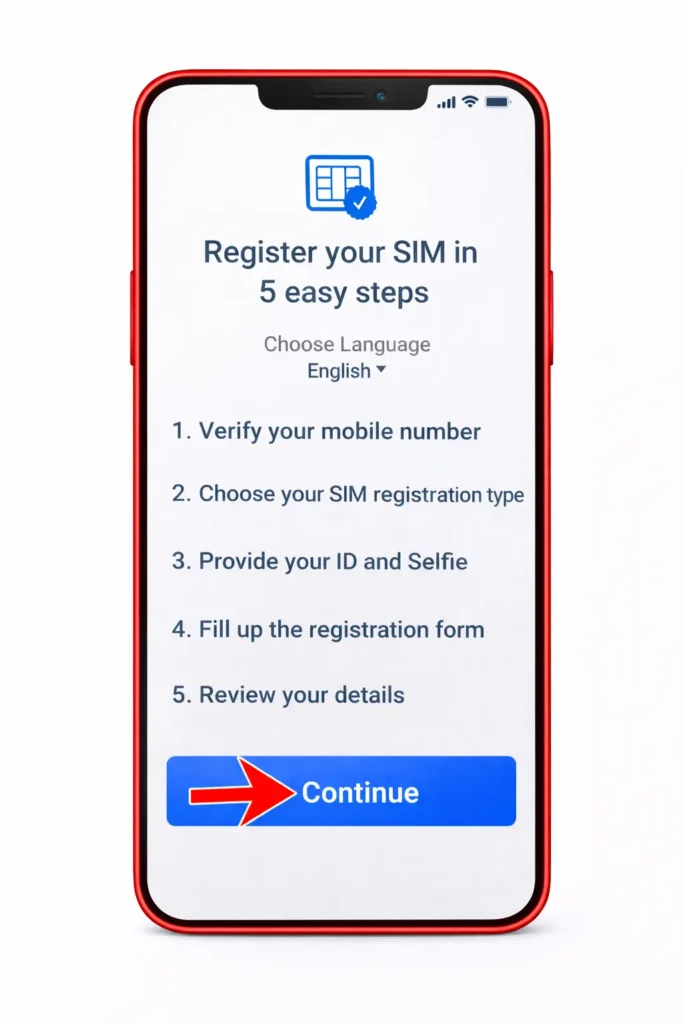
Most users finish this process online in minutes when details are correct.
Information Required for TNT SIM Registration
Prepare the following details exactly as they appear on your ID to ensure Data Matching and accurate Subscriber Identity checks:
- Full Name
- Date of Birth
- Address
- Mobile Number
Incorrect or incomplete entries can delay approval.
Accepted Government-Issued IDs for TNT SIM Verification
You must complete Identity Verification using a valid Government-Issued ID. Accepted IDs include:
- National ID
- Passport
- Driver’s License
- UMID
The system performs Identity Validation (with Biometric Verification implicit where required). Ensure ID images are clear and unexpired to avoid rejection.
Bottom line: Use the Online Registration Portal on the Official Website, follow the steps carefully, and submit accurate details with a valid ID to complete TNT SIM registration quickly and securely.
Common Registration Status Results and What They Mean
After submitting your TNT SIM details, the system will show a registration status. Understanding this result helps you know what to do next:
Always keep your Registration Reference Number. It helps track your application and proves SIM Ownership if support is needed.
Best Practices for Safe and Successful TNT SIM Registration
Follow these steps to complete registration smoothly and stay compliant:
- Use only the Official Website for all registration and updates.
- Double-check details before submission to speed up Verification.
- Keep records of your Registration Confirmation and reference number.
- Complete registration on time to meet Government Compliance requirements.
These practices reduce delays, protect your SIM, and ensure uninterrupted service.
Completing TNT SIM registration through the Official Website ensures your SIM is verified, compliant, and fully active. Keep your Registration Confirmation and reference number to protect SIM Ownership and avoid future service issues.